006. 생명주기 함수 static getDerivedStateFormProps(props, state) 사용하기
getDerivedStateFormProps(props, state)sms constructor() 함수 다음으로 실행
컴포넌트가 새로운 props를 받게 됐을 때 state를 변갱해줌
App.js에서 전달 받은 value를 props.value로 접근해 값을 가져올 수 있음
...
<LifecycleEx
	prop_value = 'FormApp.js'
/>
...
///
...
class R006_LifecycleEx extends Component {
    static getDerivedStateFromProps(props, state) { //constructor() 함수 다음으로 실행
        console.log('2. getDerivedStateFromProps Call :'+props.prop_value);
        return {}; //컴포넌트가 새로운 props를 받게 되었을 떄 state를 변경해준다
    }
...
007. 생명주기 함수 componentDidMount() 사용하기
componentDidMount() 함수는 작성한 함수들 중 가장 마지막으로 실행됨
render() 함수가 return되는 html 형식의 코드를 화면에 그려준 후 실행된다.
화면이 모두 그려진 후에 실행되어야하는 이벤트 처리, 초기화 등 가장 많이 활용되는 함수
008 생명주기 함수 shouldComponentUpdate() 사용하기
componentDidMount() 함수는 '생성' 단계의 생명주기 함수 중 가장 마지막으로 실행됨
shouldComponentUpdate() 함수는 '변경' 단계의 생명주기 함수
tmp_state2라는 state 변수에 boolean 유형의 true 데이터 셋팅 → setState() 함수는 변수 선언과 초기화를 동시에 실행
this.setState({tmp_state2 : true}); 에서 state의 변경이 발생했기때문에 '변경' 단계의 생명주기 함수인 shouldComponentUpdate()가 실행됨. 해당 함수는 boolean 유형의 데이터를 반환하는데 return 값이 true일 경우에 render() 함수를 한번 더 호출함
shouldComponentUpdate() 함수의 반환 값에 따라 render() 함수를 재실행할 수 있다는 점을 이용하면 props나 state 변수가 변경될 때 화면을 다시 그리며 제어할 수 있음
componentDidMount() { //'생성' 단계의 생명주기 함수 중 가장 마지막으로 실행됨
    console.log('4. componentDidMount Call');
    console.log('5. tmp_state :'+this.state.tmp_state);
    this.setState({tmp_state2 : true});
    //tmp_state2라는 state 변수에 boolean 타입 true 데이터 셋팅 → setState()는 변수 선언과 초기화를 동시에 실행
    //state의 변경이 발생했기때문에 '변경' 단계의 생명주기 함수인 shouldComponentUpdate()가 실행됨.
    //해당 함수는 boolean 유형의 데이터를 반환하는데 return 값이 true일 경우에 render() 함수를 한번 더 호출함
}
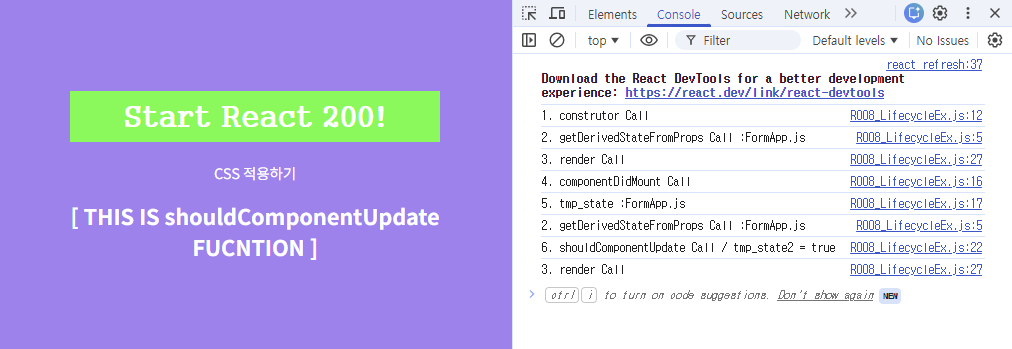
[마운트 단계] 1. constructor → 초기화 2. getDerivedStateFromProps → props를 state에 동기화 3. render → 화면 그리기 4. componentDidMount → 마운트 완료 5. tmp_state 출력 setState() 호출 = state 변경 = 업데이트 단계 시작
[업데이트 단계] 2. getDerivedStateFromProps → 업데이트 시작할 때도 항상 먼저 실행 6. shouldComponentUpdate → true 반환 3. render → true니까 화면 다시 그리기
※ import 기준 의문:
import는 파일명 기준으로 전달
export default는 파일당 하나의 컴포넌트, named export {}는 여러 개컴포넌트 전달 가능
보통 리액트에서는 파일 하나에 컴포넌트 하나 쓰는 게 관행
※ type 선언 관련 의문:
자바스크립트는 타입 지정 안 해도 됨. 동적 타입 언어
// 일반 변수 선언할 때
let name = "hello"
var num = 123

// state 변수는 setState로 var, let 사용 안함
this.setState({ tmp_state2: true })